Round Robin
What is Round Robin? Round robin is the default and most commonly used distribution method in sales team assignment. This round robin method ensures records are assigned out evenly using sequential a…
What is Round Robin?
Round robin is the default and most commonly used distribution method in sales team assignment. This round robin method ensures records are assigned out evenly using sequential assignment among team members. Distribution Engine updates the round-robin sequence after every assignment. Team members who have not been assigned to recently are first in line for the next assignment.
The term "round robin" originates from round-robin tournaments where every contestant plays against every other contestant - a fair distribution model that's been adapted for sales lead routing. Just as a round-robin tournament ensures each contestant gets equal participation, this algorithm ensures each team member receives a fair share of opportunities.
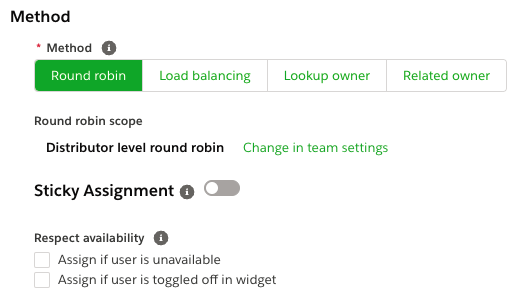
How to set up Round Robin routing in Distribution Engine.
Take a guided tour of setting up round robin routing in Salesforce, with our interactive demo.
Examples of Round Robin in Practice
Understanding round robin through practical examples can help clarify the concept:
Simple Round Robin (3 team members):
- Assignment 1: Member A
- Assignment 2: Member B
- Assignment 3: Member C
- Assignment 4: Member A (cycle repeats)
This basic pattern mirrors how a round-robin tournament ensures each contestant faces every other contestant exactly once before starting another cycle.
When to Use Round Robin
Use round robin when:
- Any team member can handle the record equally
- Fair distribution is more important than specialization
- You want predictable workload balancing
Avoid round robin when:
- You want users to always have a completely balanced workload. Load balancing can be used in this scenario instead.
Round Robin Scope
The round robin scope determines whether the round-robin order is independent per distributor or shared across the whole team. Scope is set at the team level on the team settings page and applies to all distributors on a Distribution Team. There are two possible combinations available:
- Distributor level round-robin - Each distributor within a team will have its own round-robin cycle independent of the other distributors in the team. This functions like separate round-robin tournaments running simultaneously.
- Team level round-robin - Assignments from all distributors in the team will be considered for the round-robin cycle. A team member that receives an assignment from the first distributor would go to the back of the line for an assignment from any of the other distributors in a team—similar to how a double round-robin format ensures balanced play.
Eligibility and Sequence
The round robin sequence is calculated across eligible team members only.
Eligibility is determined first (e.g. filters, availability, caps). The round robin order is then applied to the remaining eligible users.
This distinction is important when troubleshooting assignment behavior.
Sticky Assignment
Sticky assignment keeps related records assigned to the same user based on defined criteria (for example, Account, Contact, or custom key).
You'd use sticky to keep related records that come in over a period of time assigned to the same person. For example, if two records come in from Acme Corp, you might want the same person to work them.
Important considerations:
- Sticky assignment overrides normal round-robin order
- Sticky logic is evaluated before round robin advances
- Caps and availability still apply unless explicitly overridden
See Sticky Assignment documentation for more details on this advanced configuration option.
Availability Settings
- Assign if user is unavailable - if checked, records will assign regardless of team member availability (Out of Office, distribution hours, widget toggle). This setting handles situations similar to a bye in scheduling, where assignments continue even when team members are unavailable.
- Assign if user is offline in widget - if checked, records will assign when a team member is toggled offline but not when Out of Office or outside Distribution Hours.
Holidays scheduled for a Team are respected and not ignored as part of ignoring availability. This prevents assignments during scheduled time off, similar to how tournament schedules account for planned breaks.
Availability Evaluation Order
When assigning records, Distribution Engine evaluates availability in the following order:
- Holidays
- Out of Office
- Distribution Hours
- Widget online/offline state (if enabled)
Availability overrides round-robin order unless explicitly ignored by configuration.
Round Robin with Weighting and Caps
By default, round robin will assign evenly, providing balanced distribution for all team members. However, you can set up weighting or caps to control the volumes given to team members.
Important: Weighting and caps affect eligibility, not the round robin sequence itself. Once a user reaches a cap, they are temporarily removed from eligibility until capacity resets.
Learn more about weighting and caps.
How Round Robin Works in Detail
This section explains how the round robin algorithm works in more technical detail.
- Each distributor either holds its own independent round-robin sequence or respects the Team level round-robin dependent on the scope selection at the Distribution Team level.
- Every time Distribution Engine runs (e.g. every 5 minutes), each distributor's round-robin sequence continues from its previous position. It doesn't reset. This continuous rotation is fundamental to the round robin scheduling model.
- The round-robin sequence starts with the team member who has been without an assignment for the longest period of time. The member assigned to most recently will be at the back of the sequence, and the member without an assignment for the longest time will be at the front - ensuring fair rotation similar to round-robin games where playing order rotates systematically.
- If no one is available to receive assignments, then nothing happens. Leads/cases remain in the queue and the round-robin order is not changed. This maintains the integrity of the round robin schedule even during temporary unavailability.
FAQs
How quickly can I set up round robin routing with Distribution Engine?
Round robin lead routing can be configured in minutes. Simply:
- Create or select your Distribution Team
- Add team members
- Choose your scope (distributor or team-level)
- Activate the distributor
No coding, workflows, or complex formula fields required. Changes take effect immediately.
Do I need a developer to set up round robin routing in Distribution Engine?
No. Distribution Engine provides a point-and-click interface for all round robin configuration. Admins can set up, modify, and troubleshoot distribution without writing code or creating custom automation.
How is Distribution Engine different from Salesforce's native assignment rules?
Salesforce assignment rules route records to users or queues but don't maintain round robin order or track assignment history. Distribution Engine maintains persistent sequences, tracks who was assigned most recently, and automatically rotates assignments - ensuring true balanced distribution over time.
Why use Distribution Engine instead of building custom round robin with Flow or Apex?
Distribution Engine eliminates the need to:
- Build and maintain custom rotation logic
- Track assignment counters or timestamps
- Handle edge cases (availability, caps, filters)
- Debug when rotation breaks
- Update code when team changes
You get enterprise-grade round robin distribution without custom development overhead.
What if someone has been out of the office or on holiday for a period of time?
Round robin order is based on time since the last assignment. So anyone who has been unavailable for a period of time will be at the front of the round-robin sequence when they return. They will be the first to receive an assignment—similar to how a contestant returning from a bye gets scheduled for their next match.
What about team member filters/tags - how does that affect the sequence?
If you are using a team member filter/tagging to restrict who the distributor assigns to, the round-robin sequence is the same. It will look at the list of available team members according to the filter and assign to whoever is next in sequence. This creates a modified pool of contestants while maintaining the fair rotation algorithm.
What scenario would I choose Team level round-robin over Distributor level round-robin or vice-versa?
If your use case calls for multiple distributors on a team—such as when leads are being assigned from multiple queues—and assignments from each of those queues should be balanced against each other, then Team level round-robin should be selected. This creates a unified round-robin format across all assignment sources.
If the balance between assignments from each distributor should be independent of each other, Distributor level round-robin should be selected. This is similar to running separate round-robin tournaments simultaneously rather than a single combined playoff bracket.
How did we do?
Load Balancing
Related Owner