Lead Matching Logs List
The Lead Matching Logs page shows all of the logs for the lead matching classification process. The lead matching logs display the following information about each classification: Date: The date and…
The Lead Matching Logs page shows all of the logs for the lead matching classification process.
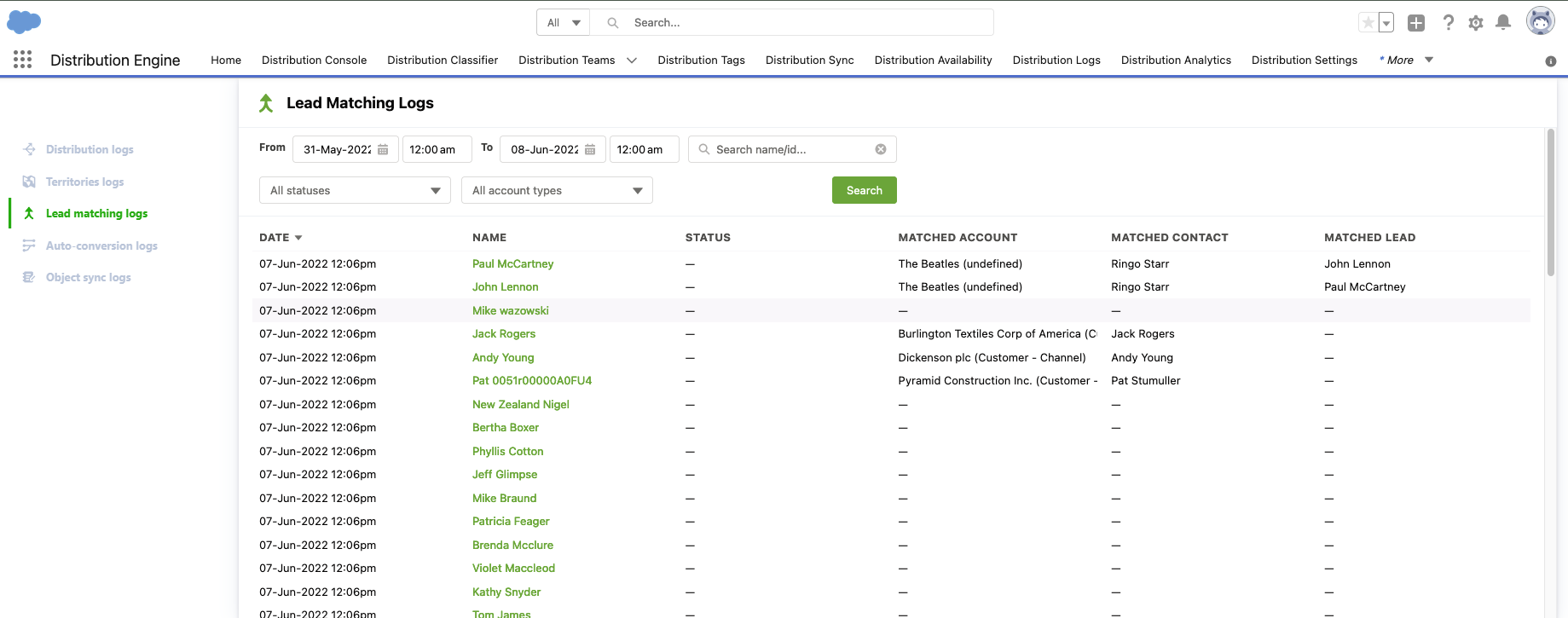
The lead matching logs display the following information about each classification:
Date: The date and time of the classification
Name: The name of the record being classified. Click the name to navigate to the record
Status: If an error occurs during classification, it will be shown here. More details can be found on the lead matching logs side panel, accessible by clicking the row
Matched Account: If an Account has been matched to the Lead, then it is displayed here. The account type is displayed in brackets
Matched Contact: If a Contact has been matched to the Lead, then it is displayed here
Matched Lead: If a Lead has been matched to the Lead, then it is displayed here.
Sidepanel Fields:
Match Details: If successfully matched, the sidepanel will display:
- The matched record name, click the name to navigate to the record
- Match confidence will display if the match was an exact match or a fuzzy match, and if fuzzy, will display the confidence of the match based on the results of the Salesforce duplicate rules processing. See Salesforce Help for more information
- The rule used for matching
How did we do?
Territories Logs List
Custom Classification Log List