Rhino Release Notes
The Rhino release of Distribution Engine is here — and it's packed with powerful new capabilities. Keep your team in the loop with the new Slack integration, delivering assignment notifications direc…

The Rhino release of Distribution Engine is here — and it's packed with powerful new capabilities.
Keep your team in the loop with the new Slack integration, delivering assignment notifications directly where they already work. This release also unlocks the ability to assign to roles within Case, Opportunity, and Account teams, giving you greater flexibility to assign . And with support for referencing fields from deeper relationships across Distribution Engine, you can now access more of your Salesforce data throughout Distribution Engine.
Rhino 22.0
Main Features
Area | Name | Description |
Integrations | This feature is currently in Beta release, please contact [email protected] for information about accessing this feature. Distribution Engine can now deliver assignment notifications and SLA alerts directly to team members in Slack. Configured at the Distributor level, you have precise control over the alerts that each team receives - ensuring that the team are notified of important work, but not disrupted by less urgent tasks. | |
Case, Opportunity & Account Teams | Salesforce optionally allows team members to be assigned not just as record owners, but to specific roles on Cases, Opportunities, and Accounts — giving you a clearer picture of who is responsible for what on each record. This is a native Salesforce feature that must be enabled in your org before use. With the Rhino release, Distribution Engine now supports this feature, allowing you to distribute work directly to these team roles. Once enabled, you can assign users to their default team or to specific roles, giving you full control over how work and responsibility are shared across your team. | |
App-Wide | Deeper Relationship References | Before the Rhino release, Distribution Engine could only query a single level of relationship when referencing field values. That limitation is now gone. With the Rhino release, you can query up to five levels of relational depth anywhere in Distribution Engine, enabling far more complex logic without the need for formula or roll-up fields. This feature is available throughout the entirety of Distribution Engine. |
App-wide | Updated look and feel for filter creation components | The filter component used across Distribution Engine, for example when creating Distributor or Team filters, has been given a new look and feel. Each rule is now split into colour-coded columns for Field, Condition, and Value, allowing you to more easily parse the contents of a filter at a glance. 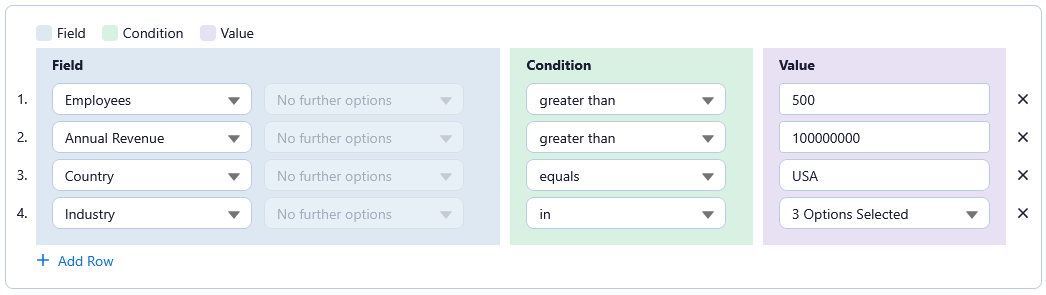 |
Rhino 22.1
Main Features
Area | Name | Description |
Retain ownership on auto-conversion | Distribution Engine now gives you more control over who ends up owning newly created records. Alongside the existing options — inheriting ownership from a matched record, or falling back to a default user — you can now retain the original lead owner as the assigned owner going forward. This is particularly useful for teams that want ownership continuity through the conversion process. | |
Deselect all tags in one click | Managing tags while adding and configuring team members just got quicker. A new "Deselect all" option clears every selected tag in a single click, rather than requiring you to scroll through a long list to find and remove them individually. This will save time when copying team member configuration when you do not want to inherit tags. | |
Expanded sort by on Distributors | There is now no limit to how many fields you can use for 'sort by' in Distributors. This gives teams with more complex prioritization needs — combining engagement scores and account attributes for example — the flexibility to order the records to be assigned as they require them. | |
More team-level filter rows | There is now no limit to the number of team filters you can create for a team. This gives more room to combine conditions when narrowing down the records that a team can assign. | |
Team Pages | Distribution Engine now supports filtering pages that list team members by the users manager. Admins can enable a new org-level setting that designates a user lookup field on the User object as each person's manager. Once enabled, a "Team Manager" filter appears wherever team members are listed. That's a helpful option for teams that have multiple managers as well as admins covering PTO or supporting broader management workflows. | |
App-wide | Wider dropdowns | Dropdown menus throughout the application can now expand wider than the collapsed control itself, so longer entries are less likely to be cut off. This makes it easier to identify the right entry at a glance, particularly for organizations using longer or more descriptive naming conventions. |
More post-assignment actions | You can now configure an unlimited number of post-assignment field-update actions, giving more flexibility to automate changes that should happen the moment a record is assigned. | |
Updated "Salesforce Teams" to "Role Assignment" | "Salesforce Teams" has been renamed to "Role Assignment" throughout the application, bringing the product in line with current marketing and documentation. This is a naming update only — no functional behaviour has changed. | |
Email filters now support 'not in' | Filters on email type fields now support the 'not in' comparison type. Great for excluding test data values. | |
Restrict team members to timer-based toggles | Admins can now limit team members to using timer-based toggles only, rather than the full set of manual toggle options for managing their availability. This is useful when you want assurance that a rep's status will automatically revert after a set period, rather than depending on them to remember to switch it back manually. | |
"Assigned to me" respects Active Status | The "Assigned to me" section of the widget can now be restricted by a record's Active Status. This helps ensure that only relevant records are shown in the widget. | |
Wider distributor names in Assignment Simulator | The distributor Name column in the Assignment Simulator now shows more of each name, with the full name available on hover where it's still too long to fit. This makes it easier to tell distributors apart when names are long or similar, without opening each one individually. | |
Absolute date values for filters | Distributor filters can now reference an exact, fixed date rather than only relative values like "the last 30 days." This is useful for scenarios such as using a specific data-refresh or cleanup date as a fixed starting point for new records, rather than having that reference point shift over time. | |
Teams collapsed by default in Distribution View | The Distribution View now opens with all teams collapsed by default, rather than fully expanded. For organizations with a large number of teams — each potentially containing many distributors — this avoids a long scroll to find what you're looking for. Expanding a team to see its contents remains just as easy as before. | |
Toggle duration shown in team member view | The team member view now shows how long each team member has been toggled off. Team managers monitoring rep availability in real time no longer need to run a separate activity report or work out the timing themselves — the duration is visible directly alongside each person's status. | |
Direct links in Classifier Health Checker notifications | Classifier Health Checker email notifications now include a direct link to the affected record, matching the behavior already used for stuck-record assignment notifications. | |
Flow-based email workflows now available | A Flow-based version of Distribution Engine's existing packaged email notification workflows is now available. This gives customers an alternative built on Salesforce Flow that they can migrate to if they choose, as the legacy workflow-based implementation is no longer actively supported by Salesforce. | |
Manual Mapping | A new method of manually mapping users has been added to the slack integration. |
Fixes
Area | Name | Description |
Slack interaction fixes | A handful of small usability issues in the Slack integration have been cleaned up. Distributor lists under "Manage Distributors" are now grouped by team by default. The bulk-action placeholder text on the "Manage Team Members" tab has also been updated for consistency. In addition, the Slack messaging utility now shows its default message as placeholder text when the field is left empty. | |
Assignment rejection consistency for role assignment distributors | Assignment rejection is now correctly disabled for distributors that assign to roles. | |
Future start dates on Get More Licenses | We've fixed an issue on the "Get More Licenses" form where choosing a future start date didn't behave as expected. Previously, selecting a date from the calendar picker would silently reset to "tomorrow" no matter which date was actually chosen, making it impossible to request a license starting further out. The form now correctly retains and applies whichever future date you select. | |
Territory import dialog fixes | Several issues with the territory import dialog have been fixed. Using "Clear All" to remove pasted items now also clears any validation messages that were showing, rather than leaving stale warnings on screen. Pasting the same value more than once — for example, entering several country codes that resolve to the same country — no longer triggers a confusing "already exists" warning when nothing was actually duplicated. Territory items are also now consistently displayed in alphabetical order, both immediately after importing a list and when reopening a previously saved territory. | |
Mouse pointer no longer changes during shift-select | We've fixed an issue in the territory map editor where using shift-click to select an area caused the mouse pointer to change unexpectedly whenever it passed over a selectable item, instead of staying consistent throughout the selectio |
How did we do?
Rhino upgrade instructions