Getting Started
Installation
Permissions
Widget & Inline Page
Classic - Distribution Engine Inline Page
Lightning - Distribution Engine Record Detail
Widget - Introduction
Adding Widget to a Lightning App
Adding Widget to a Lightning Page
Adding Widget to Salesforce Mobile
Adding Widget to a Classic Console
Adding Widget to Classic Homepage
Changing the Widget logout reason list
Distributor Test Tool (Legacy)
Before you Begin
Installation Overview
Whats in the Package
Triggers
Installation Process
Managed Package Licences
Page Layouts
Leaving A Review
Uninstall
Upgrading Distribution Engine
Configure Distribution Engine
Distribution Classifier
Territories
Territories Introduction
Create a Map
Import Territories
Territory Map Zoom Levels
Object Settings
Detecting Territories
Territory Settings
Territories - Technical Details
Territory Distributor
Lead Matching
Lead Matching - Introduction
Duplicate Rule Setup
Related Owner - Lead Matching
Lead matching vs lookup owner
Classifier Lead Matching Setup
Lead to Account/Contact/Lead Settings
Custom Classification
Custom Classification - Introduction
Stamp Groups
Stamps
Custom Classification - Synchronized Tag Collections
Lead Auto-Conversion
Lead Auto-Conversion - Introduction
Lead De-Duplication
Lead Conversion
Configuring Auto-Conversion
Auto-Conversion Rules
Distribution Classifier - Introduction
Backfill
Delay Filters
Distribution Teams
Distributors
Distribution Methods
Distribution Methods - Introduction
Lookup Owner
Load Balancing
Round Robin
Related Owner
Sticky Assignment
Distributors Introduction
Distributor Types
Standard Distributor Settings
Pull Distributor Settings
Trigger Distributor Settings
Manual Distributor Settings
Distributor Sources
Distributing from a Designated User
Distributor Filters
Distributor Team Member Filters
Distributor Sort Order
Advanced Filter Mode
Distributor Test Tool
Assigning to Roles - Account/Case/Opportunity Teams
Weighting and Caps
Distribution Hours
Tracking & SLAs
Team Settings
Distribution Teams Introduction
Distribution Viewer
Team Summary
Team Members
Team Availability
Team Performance
Assignment Rejection
Post Assignment
Stamp Rejection
Dynamic Team Members
Distribution Tags
Distribution Availability
Shift Hours
Out of Office
Distribution Holidays
Holiday Regions
Regional Holidays
User Availability Toggle
Distribution Settings
Integrations
Slack Integration - Overview
Slack Integration - Installation
Mapping Users in the Slack integration
Slack Integration - Configuring Notifications
Distribution Settings
Calendar Integration
Advanced Settings
Distribution Engine Running User
Licensed users list
Export & Import
Import Errors
Trigger Settings
Email Notifications
Email Notifications - Introduction
Custom Email Notifications
Disabling Standard Email Notifications
Customising the Email Template
Disabling Custom Email Notifications
From Email Address
Email Notification as Flow
Assignment Simulator
Assignment Simulator - Introduction
Configure Assignment Simulation
Assignment Simulator Result Explorer
Advanced
Q2Q teams
Integrating InsideSales.com power dialer
Pardot
Auto archive feature
Uploading tags via dataloader
Salesforce Mobile
Tuning Distribution Engine
Setup Introduction
Queue Basics
Queues
Distribution Sync
Monitoring
Distribution Console
Console Introduction
Application Monitoring
Today's Distributions
Sources Console
Availability Calendar
Distribution Logs
Distribution Logs
Distribution Logs List
Territories Logs List
Lead Matching Logs List
Custom Classification Log List
Auto-Conversion Logs List
Object Sync Logs List
Scheduler Logs List
Archive Logs List
Exporting Log Data
Distribution Analytics
Distribution Engine Details Object
Distribution Engine Dashboard
Salesforce Reports
Reports - Leads and Distribution Logs
Change History
Setup Examples
Rule-Based Routing
Skill Based Matching
Assigning Contacts - Pairing SDRs and AEs
Delaying Distribution
Enforce Cap for Manually Assigned Records
Criteria Caps
Splitting records between teams
Salesforce Admins
Workflow Rule Examples
Formula Examples
Domain Formula
Timezone Bucket Formula
Has Activity Formula
Territory Formula
Age Formula
Distribution Engine Details Formula
id Field to Text
Flow Examples
Chatter Notifications
Slack Notifications
Desktop or Mobile Notifications
Custom Assignment Rejection
Classify on Address Change
Assign on Action
Process Builder Examples
Process Builder - Avoiding Clashes
Opportunity Assignment - Updating Related Accounts & Contacts
Rejection API Process
Assign License and Permission Set on Team Member Addition
Tasks on Record Assignment by Distribution Engine
Information for New Admins
Validation Rules
Developers
Apex API
Availability API
Classifier API
Out of Office API
Tags API
Team Members API
DE Apex API Introduction
Rejection API
System API
Trigger Distribution API
Apex Trigger Examples
Visualforce Examples
Troubleshooting
Warnings and Errors
Health Checker Messages
Scheduler Restarted
Distributor Failures - Records on Hold
Assignment Errors
Classifier Errors
Apex CPU time limit exceeded
Timeout when deleting a Team Member or Distributor
Records Stuck / Not Being Assigned
Support
Previous Releases
2.9
3
4
4.12
4.15
Armadillo
Bison
Chameleon
Dragon
Dragon beta release - install guide
Eagle upgrade process
Eagle
Fox
Gorilla
Gorilla Upgrade Process
Hummingbird
Hummingbird Upgrade Process
Impala
Impala Upgrade Process
Jellyfish
Jellyfish Upgrade Process
Koala
Koala Upgrade Process
Llama
Llama Upgrade Process
Meerkat
Meerkat Upgrade Process
Upgrade Links
Introducing Nightingale!
Nightingale Release Notes
Nightingale Upgrade Process
Owl Release Notes
Owl Upgrade Process
Panda Release Notes
Panda Upgrade Instructions
Quokka Release Notes
Quokka Upgrade Instructions
Frequently Asked Questions
Legacy Widget - New status
Distribution Engine Aborted
Alerts not Firing
Distribution Engine Delayed
Can one Distributor Assign from Multiple Queues / Users?
Can't See Distribution Engine
Distribution Engine Not Running
Manual Shutdown of Distribution Engine
Exclude members from Holidays
Distribution Engine Health Checker Restart
Dashboard Running User Error
Assignments going to wrong user
Contact Support
Grant Login Access
Purchase
Purchasing Steps
Distribution Engine - Purchasing FAQ
Support Packages
Legal Agreement Details
GDPR
Policies
Migrating Licences
Contact us
What Tier am I on?
Features by Tier
Booking Engine - Purchasing FAQ
Latest Release
Booking Engine
Installing Booking Engine
Booking Engine Quick Start
Booking Engine - Remote Site Settings
Adding the Booking component to a record page
Booking - Permission Sets
Configuring Booking Engine
Booking Settings
Booking Types
Working Hours
Booking Type Hosts
Booking Type Settings
Book With Me Record Mapping
Guest Cancel & Reschedule Bookings
Booking Engine - External Services
Reminders
Booking Filters
All Bookings
User Settings
Making Bookings
Latest Release
Booking Engine Overview
- All Categories
- Configure Distribution Engine
- Distribution Teams
- Distributors
- Assigning to Roles - Account/Case/Opportunity Teams
Assigning to Roles - Account/Case/Opportunity Teams
This feature is available on the Advanced & Unlimited Tiers. Learn more. What are Account, Case and Opportunity teams? Salesforce allows you to assign multiple users to Account, Case, and Opportunity…

What are Account, Case and Opportunity teams?
Salesforce allows you to assign multiple users to Account, Case, and Opportunity records as a team, rather than having just one owner. Each team member can have a specific role, such as Solution Architect or Account Manager. This team-based approach provides more accurate representation of how multiple people collaborate on different aspects of a record.
Distribution Engine can automatically assign users to team roles in two ways: by using Default Teams (available for Account and Opportunity teams) or by assigning users directly to specific roles.
Assigning to Default Teams
What are default teams?
Default teams are pre-configured groups of users and roles that each Salesforce user can define for themselves. When a user becomes the owner of an Account or Opportunity record, their default team can be assigned to that record with their designated roles. This saves time by eliminating the need to manually assign team members for each new record. (See Salesforce help for Accounts and Opportunities).
Example: Alice creates a default Account team for herself that includes Bob as the Account Manager, Charlie as the Support Manager, and Danielle as the Executive Sponsor. This team represents the colleagues she typically collaborates with on account-related work.
How do I assign to default teams in Distribution Engine?
When Distribution Engine assigns Account or Opportunity records in orgs with team features enabled, you can select the option "Add default Salesforce team on assignment" on the Distributor Settings page. When this option is enabled, Distribution Engine will automatically assign the new record owner's default team members to their designated roles.
Example continued: When Alice is assigned a record through Distribution Engine with the "Add default Salesforce team on assignment" option enabled, Bob is automatically assigned as Account Manager, Charlie as Support Manager, and Danielle as Executive Sponsor.
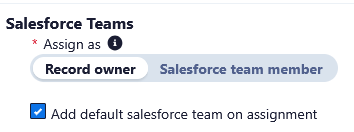
Assigning to roles
Overview
Distribution Engine can assign users directly to specific roles within Account, Case, and Opportunity teams, similar to how it assigns record owners. This approach provides more granular control, allowing you to use Distribution Engine's sophisticated routing logic to assign different users to different team roles based on your criteria.
How do I assign to roles in Distribution Engine?
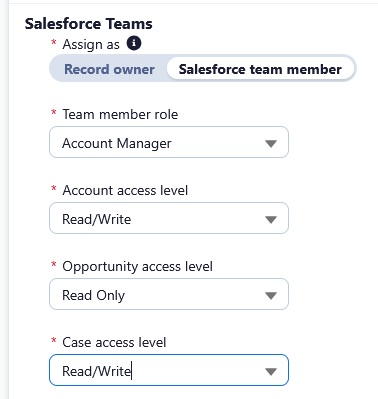
For distributors handling Accounts, Cases, or Opportunities in orgs with the appropriate Salesforce team features enabled, you can select "Salesforce Team Member" as the assignment type under Salesforce Teams on the Distributor Settings page. You will then be able to select the role that this Distributor will assign to, as well as any access level permissions required for the object.
For Accounts, you will be able to define permissions for Account, Case and Opportunity access, and for Opportunities you will be able to define Opportunity level access. There are no access level permissions settings for Cases as they are set when a Case Team Role is created.
In order to assign to multiple roles on an object; you create multiple distributors, each assigning a role within the team.
Limitations
Role assignment is only availble for use with Field Value as the source. This is in order to prevent looping behaviours where Distribution Engine would repeatedly assign the same record.
Object Sync, Assignment Rejection, SLAs, and Active & Criteria Capping are not available for assignments to a role.
How did we do?
Distributor Test Tool